Send money on 365 online – using a Physical Security Key
Already have the Bank of Ireland app? Use it to send money in app or in 365 online.
To send money in 365 online you will need to generate a unique 8 digit code using a Physical Security Key (PSK). Follow steps to send money online then:
- Take out your PSK and turn it on using the green OK button (under the number 9 key).
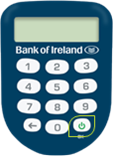
Enter the four-digit PSK PIN you chose when you set up your PSK.
Important: Entering the wrong PIN too many times will block your PSK, and you will need to request a replacement PSK.
- Press number 3 on the PSK and enter the 6-digit number that appears on 365 online. An 8-digit number will appear on the PSK. Enter this on your computer or laptop.
- Select Continue.