Update your details 365 online – using a Physical Security Key
Already have the Bank of Ireland app? Use it to change your address or update your phone number.
To update your details in 365 online you will need to generate a unique 6 digit code using a Physical Security Key (PSK). Follow the steps to change your address or update your phone number then:
- Take out your PSK and turn it on using the green OK button (under the number 9 key).
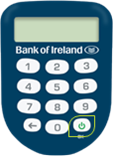
Enter the four-digit PSK PIN you chose when you set up your PSK.
Important: Entering the wrong PIN too many times will block your PSK, and you will need to request a replacement PSK.
SELECT OPT will appear on your PSK screen.
- Press number 1 on your PSK. A six-digit number will appear on the PSK screen.
- Go back to your web browser and type in the six-digit number from the PSK, then select Continue.