Logging into 365 online – using a Physical Security Key
Already have the Bank of Ireland app? Follow steps here
To log into 365 online you will need to generate a unique 6 digit code using a Physical Security Key (PSK). Visit 365 online and log in as normal then:
- Take out your PSK and turn it on using the green OK button (under the number 9 key).
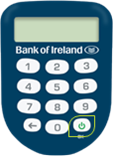
Enter the four-digit PSK PIN you chose when you set up your PSK.
Important: Entering the wrong PIN too many times will block your PSK, and you will need to request a replacement PSK.
SELECT OPT will appear on your PSK screen.
- Press number 1 on your PSK. A six-digit number will appear on the PSK screen.
- Go back to your web browser and type in the six-digit number from the PSK, then select Continue. You should now be logged in and have access to your accounts.